How to revive yourself or a teammate in The Labs
Updated 2026-11-21 · The Labs 1.0
If you become Lost, select Use a Vial on the Lost screen while the option is available. Buy a 500 Ambrosia Vial from Dioda before the run. You can use one vial per Labs run. To bring back a Lost teammate, a survivor can spend an Ambrosia Heart at the elevator’s Reanimator when that teammate is available to select.
How to revive
Know which item you have
Check your Ambrosia Vial balance in the Labs lobby before boarding. A team earns Ambrosia Hearts through successful Dessa’s Experiments. Confirm the Heart at the elevator terminal after the experiment, because rewards can depend on the team surviving the objective.
Which item recovers a Lost Toon Item Who it helps Where to use it Ambrosia Vial Your Lost Toon, once per Labs run Use a Vial on your Lost screen Ambrosia Heart A Lost teammate Reanimator in the elevator Extra Heart A Toon who is still alive. Absorbs a hit. Its protection applies while the Toon is alive Use a Vial when you become Lost
On the Lost screen, choose Use a Vial before the on-screen countdown expires if you want to continue now. The action uses one vial and returns your Toon to play. If you plan to wait for a teammate, choose Spectate and stay in the run. Once you’ve used a vial, look to a surviving teammate and the elevator Reanimator for any later recovery. Your Toon drops carried items when Lost.
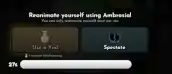
Use a Vial is left of Spectate. The timer under both options shows how long you have to choose. BlushCrunch Studio, 1.0 devlog (3:25). Reanimate a teammate at the elevator
As a survivor, reach the elevator and look for the Reanimator. The terminal shows when the team has an Ambrosia Heart. Interact with View, choose the Lost teammate available in the terminal and follow the prompt to use the Heart. Tell the Lost player to stay in the run until the action completes. If the Heart or teammate is unavailable, keep the surviving Toons moving and check again on a later elevator ride if another Experiment earns a Heart.
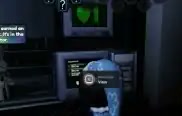
Look for the green Heart count above View at the Reanimator. BlushCrunch Studio, 1.0 devlog (3:10).
What success looks like
Reanimation succeeds when the Lost Toon is active in the same run again and can resume moving and helping. Check your items and health as soon as you regain control.
If you get stuck
If Use a Vial is unavailable, stay in Spectate if a teammate is still alive and can reach the Reanimator with an Ambrosia Heart. If everyone is Lost and no vial prompt remains, start a new run.